How to turn any coding agent into a motion studio.
Everyone saw the Opus 5.5 motion films. Most people who tried got the same first render: a centred title, a gradient, everything fading in.
I've been making these films for two weeks, more than fifteen of them: launch films, explainers, music-led pieces, and spec films for real products like unfair.so (40 s) and heyclicky (39 s). The unfair.so one is the film you'll see taken apart below, and the full film is posted on my profile. Along the way I measured 74 of the viral ones frame by frame.
The result: a studio isn't a better prompt. It's a stage, a rules file, a set of checks that have to pass, and a loop. This article is all of that, with the code and the real numbers. You can copy every part into your own setup tonight, with or without my tool.
What's inside:
- The bar: what 74 viral films actually measure
- The stage: the one rule that makes a film renderable, with code
- The guides: a rules file you can paste
- The sensors: six checks with exact commands and thresholds
- Sound from motion: the part almost everyone gets wrong (measured)
- The loops: inside one film, and across every film
- Ten traps that broke my real drafts
- The setup, step by step
1 · What do the viral films actually measure?
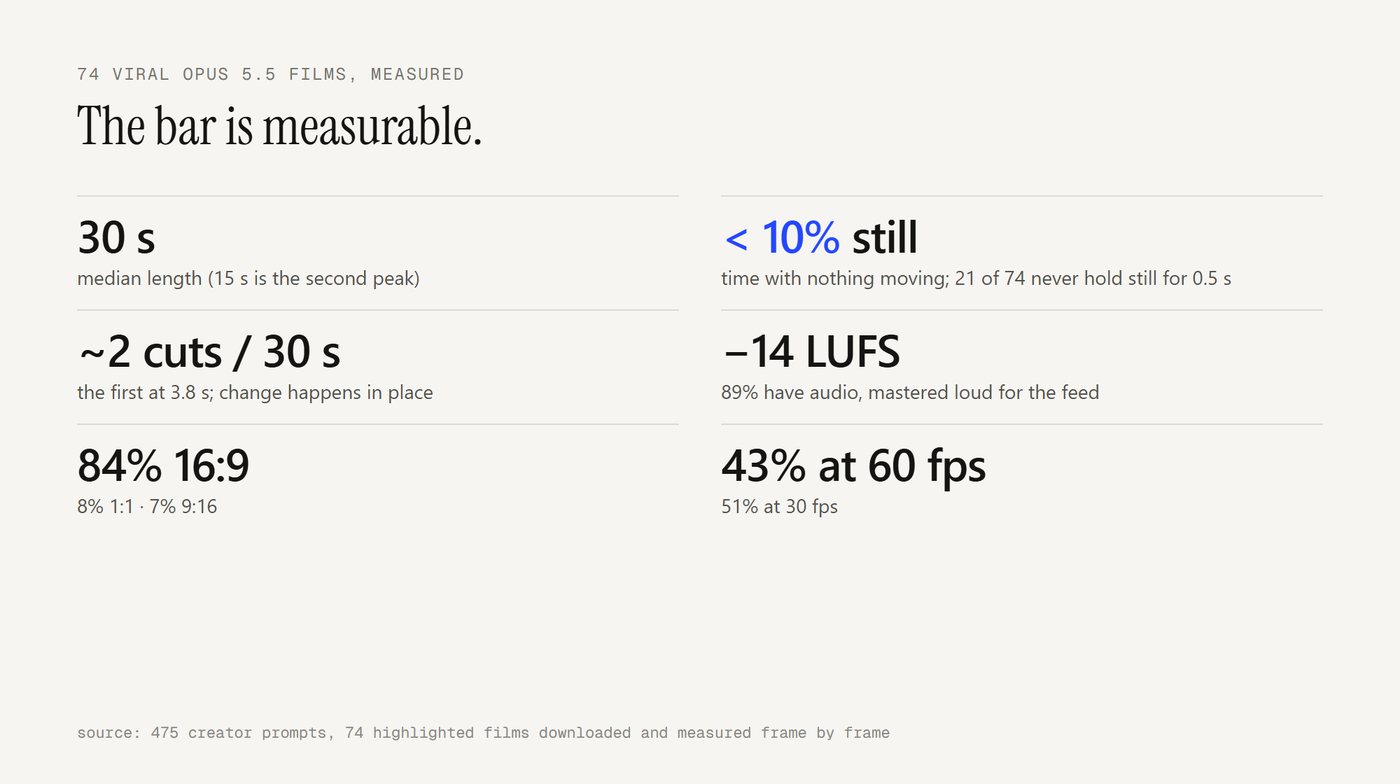
Before building anything, I wanted a target that wasn't taste. So I took the public collection of films people made with Opus 5.5 in its first weeks (475 creator prompts), downloaded the 74 highlighted motion and explainer films, and measured them.
- Length: 30 s median (15 s is the second peak)
- Aspect: 84% 16:9, 8% 1:1, 7% 9:16
- Frame rate: 51% at 30 fps, 43% at 60 fps
- Audio: 89% have it, mastered around −14 LUFS
- Hard cuts: About 2 per 30 s, the first at 3.8 s
- Time with nothing moving: Under 10%. 21 of the 74 never hold still for half a second
The headline: the best films barely cut. They change one stage in place. A card morphs into its next state, a number rolls, a headline rewrites one word. Cuts are punctuation, two to four per film, on the beat.
This matters because "make it premium" is unmeasurable, but "under 10% still, at most 6 cuts per 30 s, −14 LUFS" is something a script can check. Everything below hangs off that table.
2 · The stage: why must a frame be a function of time?
The model can't hand you an mp4. It writes a program that draws one frame, and a renderer runs it for every frame. I use HyperFrames (open source, HTML + GSAP, renders headless to mp4); Remotion and fframes work on the same idea.
The one rule: anything you see at time t is computed from t. No timers, no Math.random(), no CSS transitions, no state that remembers the previous frame. The renderer seeks frames out of order, so anything that "remembers" goes stale.
The smallest useful helper, which ended up running most of my films. Keyframes as a pure function of time:
// [[t, value, ease], ...]  the ease belongs to the segment ENDING at that key
const E = { lin: x => x, out: x => 1 - (1 - x) ** 3, in: x => x ** 3,
            io: x => x < .5 ? 4 * x ** 3 : 1 - (-2 * x + 2) ** 3 / 2 };
const kf = (t, ks) => {
  if (t <= ks[0][0]) return ks[0][1];
  for (let i = 1; i < ks.length; i++) if (t <= ks[i][0]) {
    const [t0, v0] = ks[i - 1], [t1, v1, e = "io"] = ks[i];
    return v0 + (v1 - v0) * E[e]((t - t0) / (t1 - t0));
  }
  return ks[ks.length - 1][1];
};
// a views counter that can be scrubbed backwards and never lies:
el.textContent = fmt(kf(t, [[19.95, 1600], [22.35, 238000, "out"]]));
And the second one: motion that feels physical. Easing curves look like software; springs look like objects. A closed-form damped spring you can pass straight to GSAP as an ease:
const spring = (zeta = 0.75, w = 12) => p => {
  if (p <= 0) return 0; if (p >= 1) return 1;
  const t = p * w, wd = Math.sqrt(1 - zeta * zeta);
  return 1 - Math.exp(-zeta * t) * (Math.cos(wd * t) + zeta / wd * Math.sin(wd * t));
};
const UI = spring(0.72, 13);   // ~4% overshoot: buttons, cards
const TYPE = spring(0.99, 11); // no overshoot: never bounce a headline
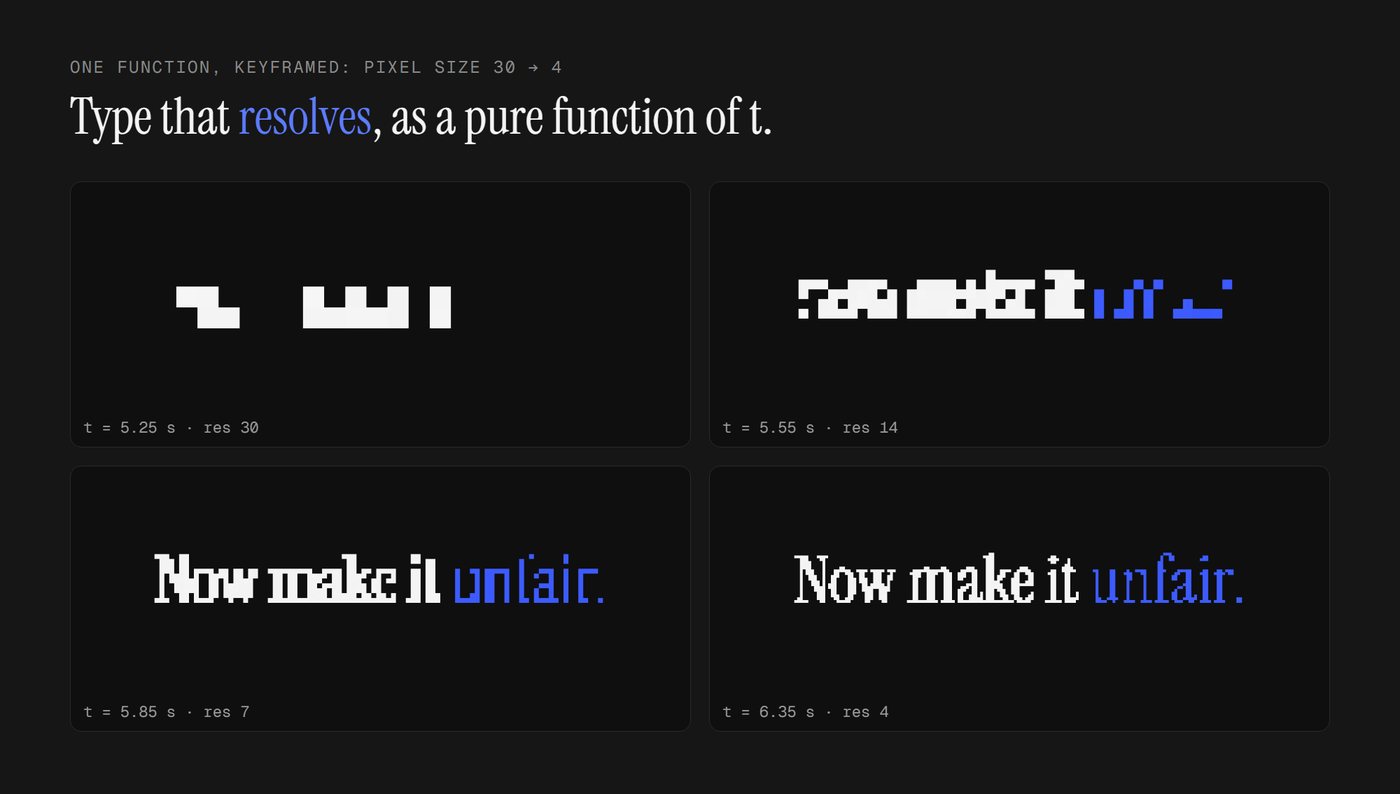
With those two, a whole look becomes a function. The unfair.so film's headlines are a real serif drawn small on a canvas, thresholded to 1-bit and scaled up with no smoothing. The pixel size is keyframed from 30 to 4, so the type "resolves" out of blocks:
function pixText(cv, text, color, size, res) {          // res: pixel size, 30 = blocks, 4 = crisp
  const off = document.createElement("canvas"), w = cv.width / res | 0, h = cv.height / res | 0;
  off.width = w; off.height = h; const g = off.getContext("2d");
  g.font = `${size / res}px "Instrument Serif"`; g.fillStyle = color; g.textAlign = "center";
  g.fillText(text, w / 2, h * 0.7);
  const img = g.getImageData(0, 0, w, h);
  for (let i = 3; i < img.data.length; i += 4) img.data[i] = img.data[i] < 100 ? 0 : 255;   // 1-bit
  g.putImageData(img, 0, 0);
  const ctx = cv.getContext("2d"); ctx.clearRect(0, 0, cv.width, cv.height);
  ctx.imageSmoothingEnabled = false; ctx.drawImage(off, 0, 0, w * res, h * res);
}
// every frame: pixText(cv, "Now make it unfair.", "#F4F4F4", 196, kf(t, [[5.25, 34], [6.35, 4, "out"]]));
One detail that cost me an afternoon: canvas text uses a font only once it has loaded. Declare it with @font-face AND put it in a hidden span, so the renderer waits for it.
3 · The guides: what goes in the rules file?
Everything the agent reads before it acts. Mine started at five lines; every bad render added one. This is the version I'd start with today:
# film rules (binding)
1. Every visible value is a pure function of time t. No timers, no Math.random, no CSS
   transitions. Text that changes over time picks its state from t.
2. Springs, not easing curves. Headlines never overshoot.
3. One stage, many states. Change things in place; at most 6 hard cuts per 30 s.
4. Nothing holds still for more than ~1 s (end card excepted): the camera always drifts
   1 → 1.04 across a scene; idle elements breathe.
5. Real data only. Every number, name and claim traces to the brief or the captured site.
   Example rows are labelled "example". People are generated avatars, never real faces.
6. Colour has a job: one accent, used only for the state, the hit, the one word.
7. Every clip has an explicit CSS z-index, in one ordered list.
8. Move things with transforms (x, y, scale), never top/left/width.
9. Every on-screen press, landing and number roll has a sound, placed on its frame.
10. Nothing ships until every check in CHECKS.md passes. Never report a check you could
    not run as passed.
Banned: centred title on a gradient, everything fading in at once, bounce eases on text,
floating particles with no purpose, emoji, "Introducing…", invented numbers.
Two more guides do most of the remaining work:
- A reference with instructions on what NOT to take. Naming a look ("Apple product-page micro-interaction", "movie-trailer cold open") beats describing one. But say what to borrow (the type, the pacing) and what to leave (their layout, their content).
- The product's own words. The best film I made used the brand's exact step names, button labels and numbers ("01 Post · 02 Lineup · 03 Go", "Counter $145 → $120", "1.6K → 238K views"). The model is great at layout and bad at guessing facts.
4 · The sensors: which six checks catch a bad film?
Guides make a good first render likely. Sensors make a bad one impossible to ship. All of these run on the rendered mp4, so they work with any engine.
1. Stillness (target: ≤ 10% of the film, no single hold over ~1.2 s except the end card)
ffmpeg -i film.mp4 -vf "scale=320:-2,freezedetect=n=0.002:d=0.5" -an -f null - 2>&1 | grep freeze_
Sum the freeze spans, divide by the length (ignore the last 2 s, the end card is meant to hold).
2. Hard cuts (target: ≤ 6 per 30 s, the first after ~2 s)
ffmpeg -i film.mp4 -vf "scale=320:-2,select='gt(scene,0.3)',showinfo" -an -f null - 2>&1 | grep -o "pts_time:[0-9.]*"
3. Loudness (target: about −14 LUFS integrated, true peak ≤ −1 dBFS)
ffmpeg -i film.mp4 -af ebur128 -f null - 2>&1 | grep -E "^\s+I:|Peak"
4. Frame 0 (target: a finished composition, no half-entered word). Render the still, look at it. This is your thumbnail on the feed.
5. A contact sheet for the model's own eyes:
ffmpeg -i film.mp4 -vf "fps=1,scale=384:-1,tile=6x5:padding=4" -frames:v 1 sheet.jpg
Opus 5.5 reads images, so it can grade this itself: collisions, text on busy backgrounds, a frame that needs a caption to be understood.
6. Sound on motion. Section 5, because it deserves its own.
This is what the checks said on the unfair.so film before it shipped:
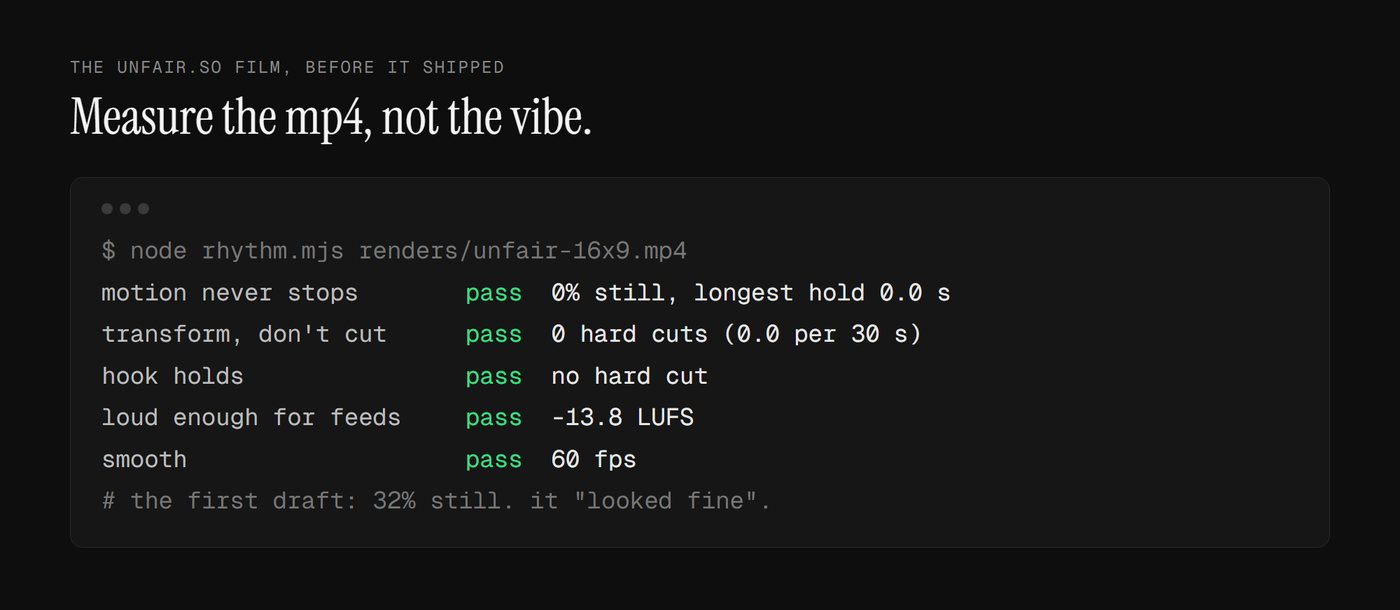
It did NOT look like that the first time. The first draft was 32% still. The heyclicky film's first draft was 24% still. Both "looked fine" when I watched them. The checks caught what my eye forgave. The fixes were boring and worked: a slow camera push on every scene, an idle bob on the pointer, a field of slow pixel stars behind the night scenes.
And one inferential sensor on top: the builder never judges its own film. After my own pass, a fresh agent sees only the render and the brief, nothing about my intentions:
You are an independent, harsh film critic. You did NOT build this; judge rendered pixels and
measured audio, not intentions. Artifact: renders/draft.mp4 (40 s, 1920x1080). Brief: <brief>.
Extract a contact sheet every 0.2 s, native frames at the key moments, and dense 1/30 s windows
around each cut. Find frozen stretches. Measure loudness and check sounds land on visible events.
Report per scene, ranked with timestamps; then the top 6 fixes by impact; end with SHIP or
ONE MORE PASS.
A new critic each round, never told what was fixed. Three rounds max.
5 · Sound from motion: where should each sound go?
A sound is believable when the eye causes it. I assumed my films did this, because every click in the storyboard had a click in the score. Then I measured.
The method, so you can run it on anything:
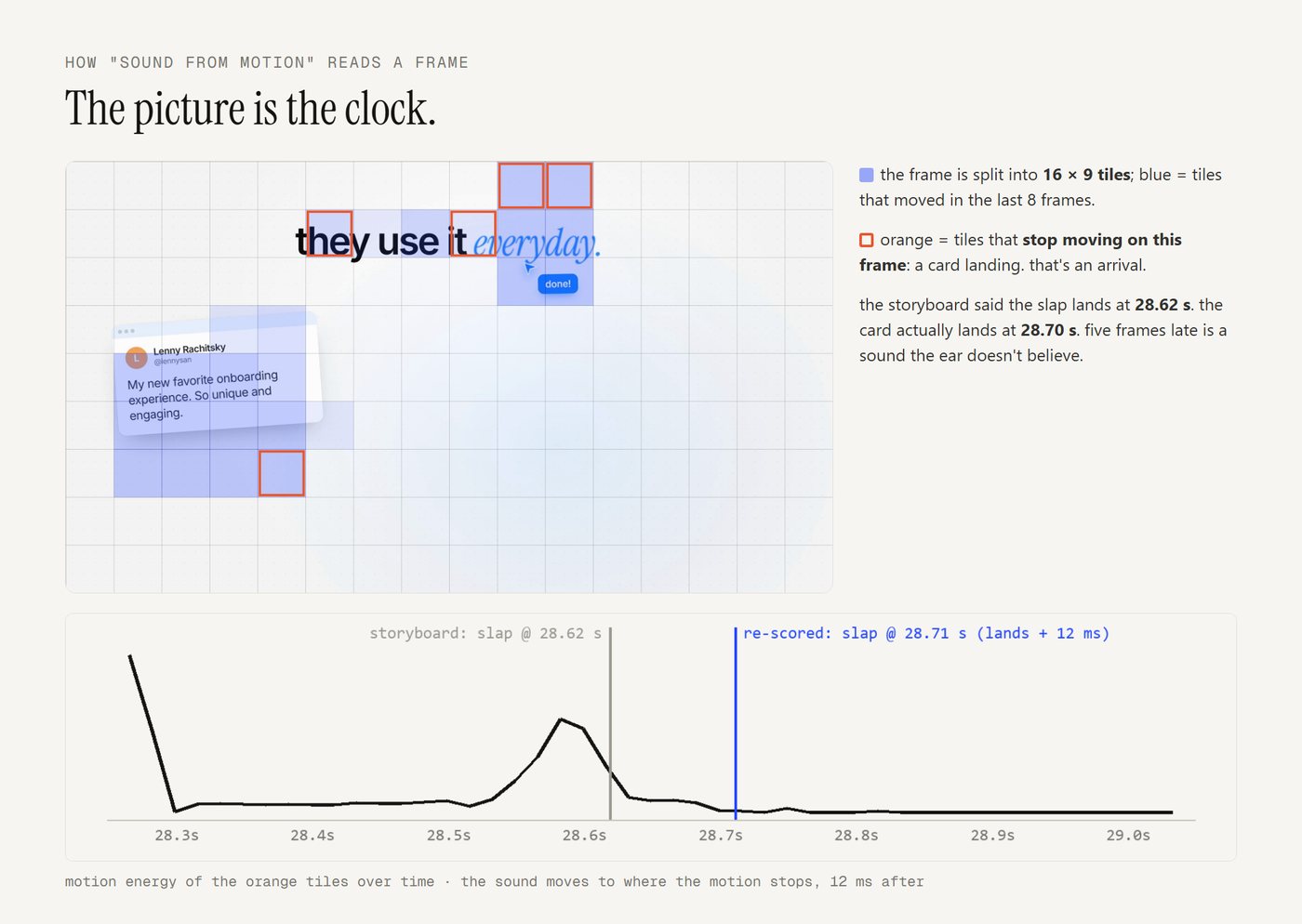
- What moves: Split each frame into a 16×9 grid of tiles. A tile "starts" when it moves after three still frames, and "lands" when its motion stops. A cut is the whole frame changing at once.
- What sounds: Pull the 1.5–12 kHz band (clicks, ticks, pops, whooshes; kicks and bass ignored) and find the transients.
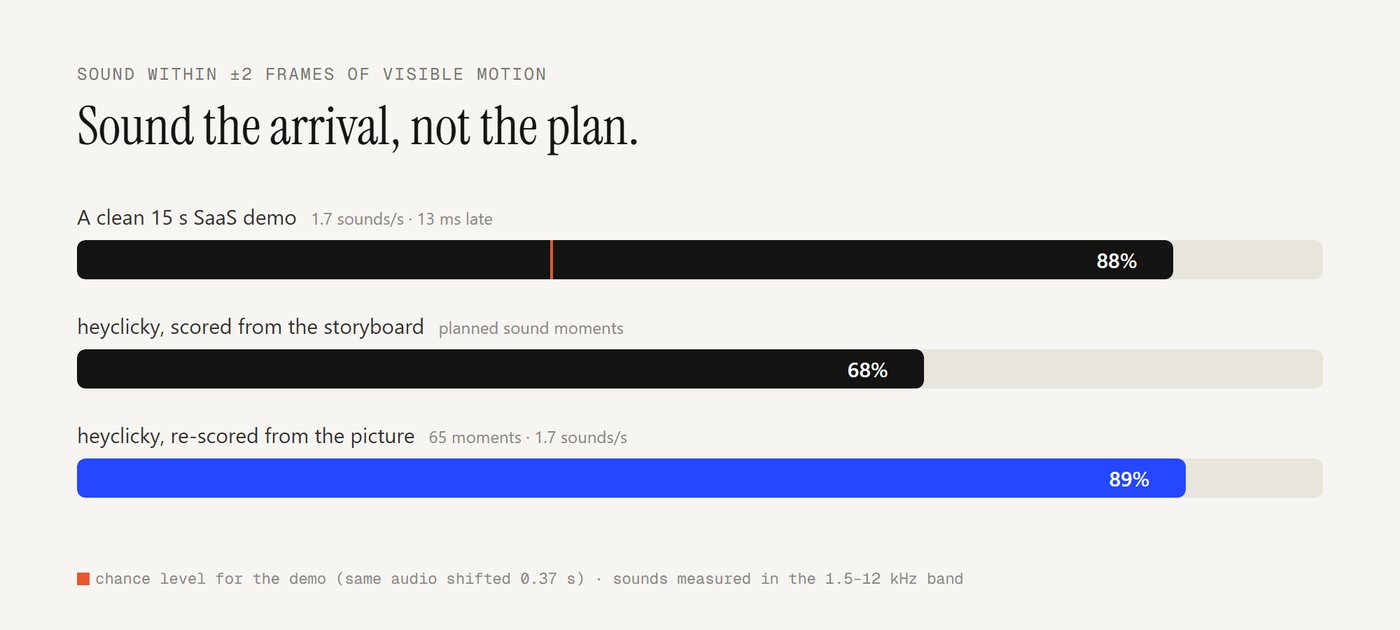
- Match: A sound counts as synced if a visual event sits within ±2 frames of it. Compare against the same audio shifted by 0.37 s, which is what chance looks like.
ffmpeg -i film.mp4 -vn -ac 1 -ar 24000 -af "highpass=f=1500,highpass=f=1500,lowpass=f=11000" -f f32le sfx-band.raw
ffmpeg -i film.mp4 -vf "fps=60,scale=192:108:flags=area,format=gray" -f rawvideo frames.raw
The results:
- A clean 15 s SaaS demo from the timeline (195K views): 1.7 sounds a second, 88% within 2 frames of motion. Chance is 38%.
- My heyclicky film, scored from the storyboard: 68% of planned sound moments on motion.
- The same film, re-scored from the picture: 89% of 65 moments, 1.7 a second.
On the full mix, my two shipped films scored at or barely above chance (heyclicky 0.95x, unfair.so 1.24x). The storyboard said "pop at 4.21 s"; the element actually finished landing at 4.30 s. 90 ms is three frames, and the ear notices.
What the good one does, in numbers:
- It sounds arrivals, not launches. Of its synced sounds, 14 sit on something landing, 7 on something starting, 1 on a cut.
- It sounds small things. The median moving element under a sound covers 3 of 144 tiles: a chip, a checkbox, a number. The big moves get the music.
- It's slightly late, never early. Median 13 ms after the frame. A sound before its picture reads as fake.
- It's sparse. 1.7 sounds a second. Not every motion, every arrival that matters.
So the fix isn't "add more sounds". It's re-scoring from the render:
- Plan sounds in the storyboard as usual.
- Render a draft.
- Move each sound onto the real frame within ±0.2 s:
- Arrivals (stamp, slam, card settling): where the element stops.
- Presses and pop-ins: Where it starts to move.
- Whooshes: On the fastest frame of the move.
- The drop: On the cut.
- Sounds planned together (a drop and its impact): they move together.
- Give the big arrivals the plan left silent a quiet sound sized to the element: a tick for small, a soft thock for medium.
- Stop at ~1.7 a second.
- Place every sound by its measured peak, not its file start. A click's peak is a few ms in; a whoosh's is in its middle.
Two small UI-sound tricks from the cleanest films:
- A press is two sounds: A dull press on the dip and a brighter release ~90 ms later.
- A drag ticks once per step it crosses: Stars on a rating, notches on a slider. The ticks crowd where the drag is fastest.
And if the brief says "calm, no bass": don't hunt for a calm song, use the soft passages of a good one.
- Pick the passages: The bars at or under the song's median loudness, spliced on bar lines.
- Level the joins: Each join starts at the level the last passage ended on, then eases to its own over 3 s. Without this the joins jumped 5.6 and 7.2 dB; with it, under 3.
- Lose the bass: Two 12 dB/oct high-passes at 95 Hz.
On one song, the automatic pick chose the same middle passage, to the bar, that I had chosen by ear.
6 · The loops: how does it keep improving?
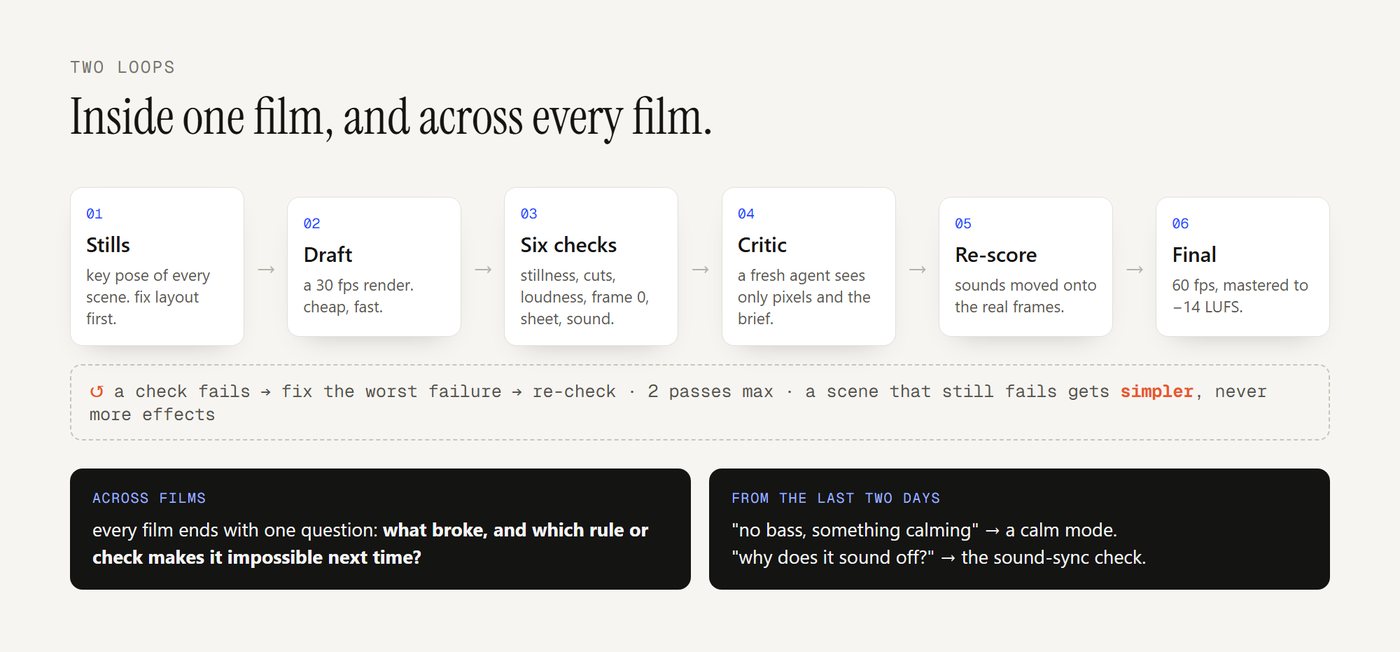
The loop inside one film.
- Stills of every scene's key pose. Fix the composition first, because layout is cheap and motion is expensive.
- A draft render at 30 fps, then all six checks.
- Fix the worst failure, then re-check.
- Stop when every check passes or after two passes. A scene that still fails gets simpler (fewer elements, bigger type), never more effects.
- One independent critic round.
- Re-score the sound from the draft.
- The final render at 60 fps, then master to −14.
As a goal you can hand an agent:
/goal renders/draft.mp4 passes all six checks in CHECKS.md (stillness <= 10% and no hold
over 1.2 s, <= 6 cuts per 30 s, -14 LUFS +/- 1, frame 0 composed, contact sheet reviewed,
>= 85% of sound moments within 2 frames of motion). Fix the worst failure each round.
Abort if a round fixes nothing. Stop after 5 rounds. Never mark a check you could not run
as passed.
The loop across films. This is where it compounds. Every film ends with one more step: what broke, and which rule or check makes it impossible next time? a bug that reached a draft becomes a line in the rules file or a new sensor. A technique that worked becomes a reusable function. A client note becomes a default.
Two examples from the last two days:
- "No bass, something calming" (a mid-build note on one film) became a calm mode that every future film can use.
- "Why does it sound slightly off" became the sound-sync check in section 5, which then showed my own films were scoring at chance.
When the same problem shows up twice, fix the studio, not the film.
7 · Which ten traps broke real drafts?
Each of these reached a draft at least once. None of them shows up in a single prompt test.
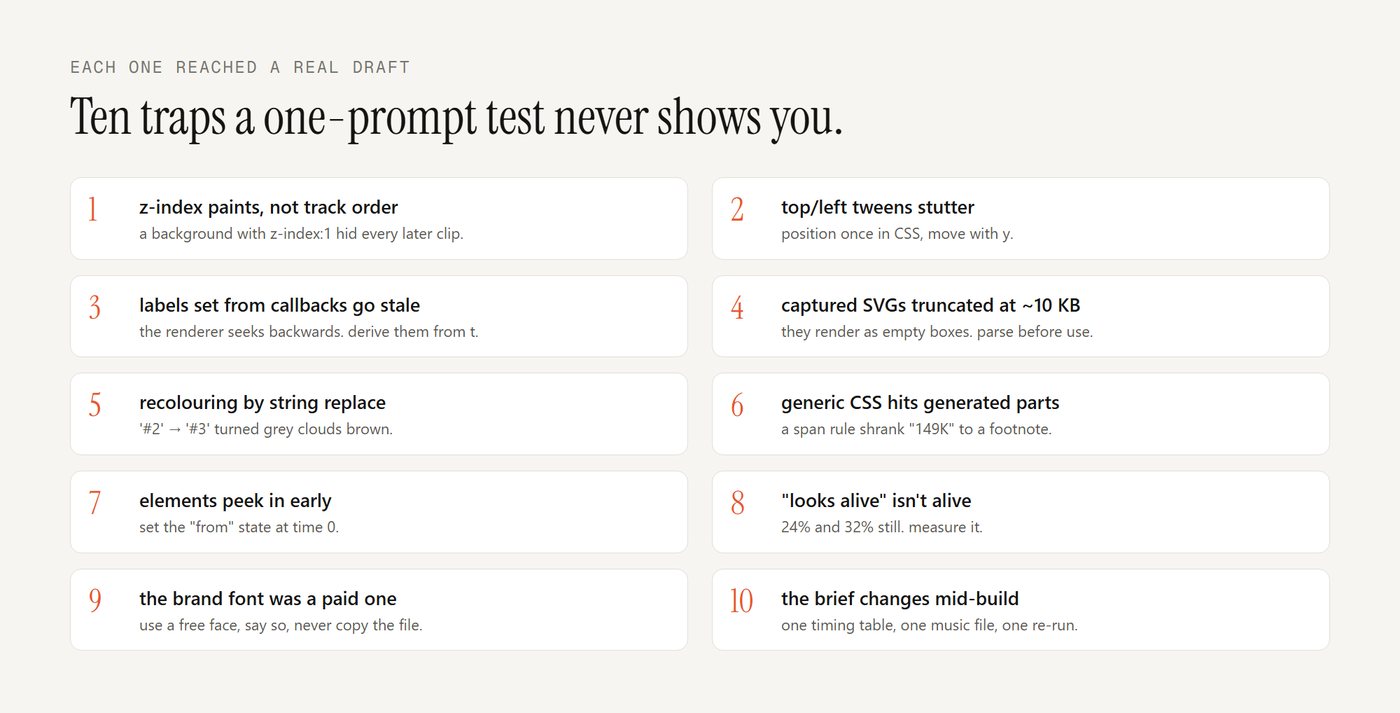
- CSS z-index paints, not track order. A background clip with
z-index:1covered every later clip that had none, so the window and its videos vanished. Give every clip an explicit z-index in one list. top/lefttweens stutter in frame-by-frame renders and fail lint. Position once in CSS, move withy.- Labels set from tween callbacks go stale when the renderer seeks backwards. Derive them from t.
- Captured SVGs over ~10 KB came back truncated and rendered as empty outlined boxes. Parse every captured SVG before using it.
- A colour replace on SVG text (
'#2' → '#3') hit unrelated hex digits and turned grey clouds brown. Recolour by parsing fills, never by string replace. - Generic CSS rules hit generated parts. A
spanrule shrank "149K" to a footnote. A generated#bar${i}collided with a hand-named#bar10. Unique names for hand-made parts. - Elements peek in early. Set the "from" state at time 0, or the window sits at its final place for one frame before its entrance.
- "Looks alive" isn't alive. 24% and 32% still on films I'd have sworn moved constantly. Measure it.
- The brand's display font was a paid one. Use the closest free face and say so; never copy the file.
- The brief changes mid-build. "Make it 30 to 40 sec", "no bass music". Keep timings in one table at the top and music settings in one file, so a change is one edit and one re-run.
8 · The setup, step by step
- The engine: HyperFrames (HTML + GSAP), Remotion (React) or fframes (Rust + SVG, very fast renders). Pick the one your agent writes best. All the checks above work on the mp4, so they don't care which.
- The stage helpers:
kf()andspring()from section 2, in a file every film loads. - The guides: The rules file from section 3 as CLAUDE.md or AGENTS.md, plus one reference per film with what to take and what to leave.
- The sensors: The six commands from section 4 in one script that prints pass/fail, plus the critic prompt.
- The sound: Score from the storyboard, render a draft, re-score from the picture (section 5).
- The goal: The
/goalfrom section 6, with a turn limit. - The spine: One log file of what broke and which rule it became. Read it at the start of every film.
That's the whole studio. None of it is the model, and all of it decides the result.
The full unfair.so film, made with everything above:
Watch the full unfair.so film on X →
We packaged all of this as TeaserKit: the stage helpers, 11 house styles, a real-music library arranged on bar lines, the six checks, sound from motion, the critic loop and the learning loop, as a skill for Claude Code or Codex, or an app on any API key. It's what made the films in this post. But every idea above works without it, and I'd rather you build your own studio than buy a prompt.
Want it done for you?
TeaserKit packages this whole studio: the stage helpers, 11 house styles, a real-music library cut on bar lines, the six checks, sound from motion, the critic loop and the learning loop, for Claude Code, Codex or any API key.
Questions people ask
Can a coding agent make motion graphics?
Yes. Models like Claude Opus 5.5 write the film as code (HTML, CSS and animation, or React, or Rust and SVG) and a renderer turns it into an MP4 frame by frame. The quality comes from the rules and checks around the model, not from one prompt.
What is the most important rule for AI-made motion graphics?
Every visible value must be a pure function of time: no timers, no Math.random(), no CSS transitions, nothing that remembers the previous frame. Renderers seek frames out of order, so anything else goes stale.
How do you know if an AI video is good before you post it?
Measure the MP4: the share of time with nothing moving (under 10%), hard cuts (at most 6 per 30 seconds), loudness (about −14 LUFS), frame 0 as a finished thumbnail, a contact sheet the model can read, and whether sounds land within 2 frames of visible motion.
Which renderer should I use: HyperFrames, Remotion or fframes?
Whichever your agent writes best. HyperFrames is HTML and GSAP, Remotion is React, and fframes is Rust and SVG with very fast renders. The checks in this guide run on the finished MP4, so they work with all three.