Sound design for motion graphics: put every sound on the frame.
Why does sound sync matter so much?
A sound is believable when the eye causes it. Three frames of offset (about 50 ms at 60 fps) is enough for a click to feel pasted on. We assumed our own films were synced, because every click in the storyboard had a click in the score. Then we measured: on the full mix, our two shipped launch films scored at or barely above chance. The storyboard said "pop at 4.21 s"; the element actually finished landing at 4.30 s.
What do well-sounding films actually do?
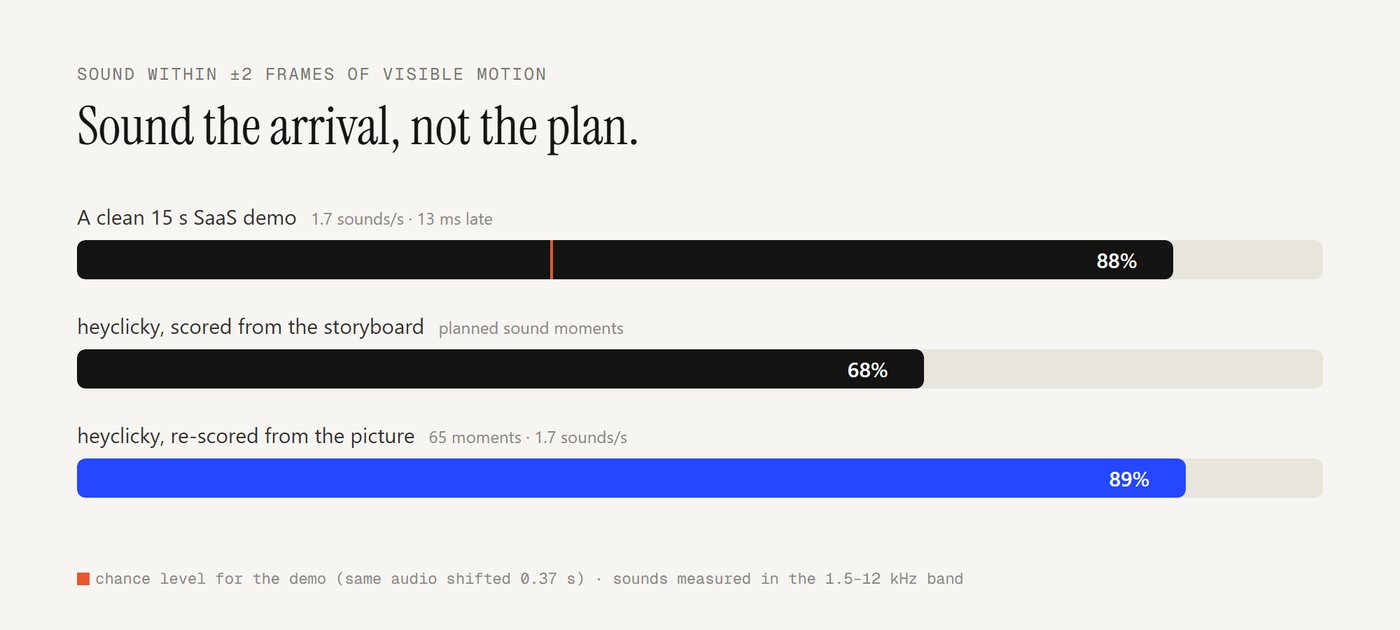
| Film | Sounds per second | Sounds within 2 frames of motion | Chance level |
|---|---|---|---|
| A clean 15 s SaaS demo (195K views) | 1.7 | 88% | 38% |
| heyclicky spec film, scored from the storyboard | 1.4 | 68% of planned moments | |
| The same film, re-scored from the picture | 1.7 | 89% of 65 moments |
What the clean one does:
- It sounds arrivals, not launches. Of its synced sounds, 14 sit on something landing, 7 on something starting, 1 on a cut.
- It sounds small things. The median moving element under a sound covers 3 of 144 tiles of the frame: a chip, a checkbox, a number. The big moves get the music.
- It's slightly late, never early: a median of 13 ms after the frame.
- It's sparse: 1.7 sounds a second. Not every motion: every arrival that matters.
How do you measure sound sync in your own film?
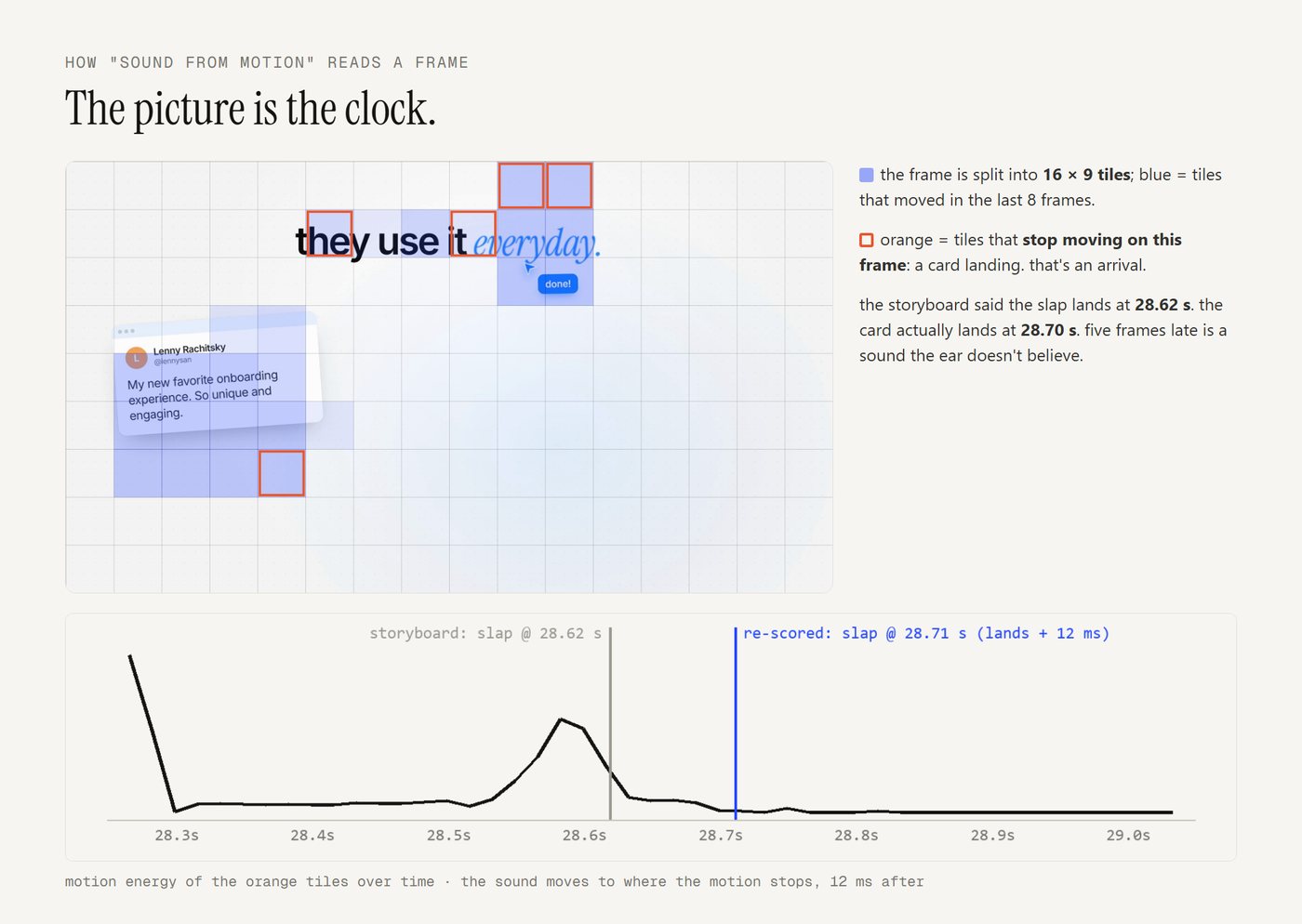
- What moves: split each frame into a 16×9 grid of tiles. A tile "starts" when it moves after three still frames and "lands" when its motion stops. A cut is the whole frame changing at once.
- What sounds: take the 1.5–12 kHz band (clicks, ticks, pops and whooshes live there; kicks and bass don't) and find the transients.
- Match: a sound counts as synced if a visual event sits within ±2 frames. Compare against the same audio shifted by 0.37 s: that is what chance looks like.
ffmpeg -i film.mp4 -vn -ac 1 -ar 24000 -af "highpass=f=1500,highpass=f=1500,lowpass=f=11000" -f f32le sfx-band.raw
ffmpeg -i film.mp4 -vf "fps=60,scale=192:108:flags=area,format=gray" -f rawvideo frames.raw
What are the rules for placing each sound?
- Plan in the storyboard, place from the render. Render a draft, then move each sound to the real frame within ±0.2 s.
- Arrivals (a slam, a stamp, a card settling): where the element stops moving.
- Presses and pop-ins: where the element starts to move.
- Whooshes: peak on the fastest frame of the move.
- The drop: on the cut. Sounds planned together (a drop and its impact) move together.
- Fill the silent arrivals, quietly: a tick for small elements, a soft thock for medium ones. Stop at about 1.7 a second, keep 0.15 s between sounds, and leave typing and counting alone.
- Place by the peak, not the file start. A click peaks a few milliseconds in; a whoosh peaks in its middle.
- Audit before you ship: at least 85% of planned sound moments within 2 frames of visible motion.
Which UI sounds work best?
- A press is two sounds: a dull press on the dip and a brighter release about 90 ms later.
- A drag ticks once per step it crosses (stars on a rating, notches on a slider), crowding where the drag is fastest.
- A toggle is a short pitched thunk with a click; a UI pop is a rising chirp; success is two bright notes a fifth apart; a swish is band-passed air.
- Keep them one family: short, bright, and under the music. Big hits (impacts, slams, drops) stay rare.
How do you make calm music with no bass?
Use the soft passages of a good song instead of hunting for a calm one:
- Pick: the bars at or under the song's median loudness, in song order, spliced on bar lines.
- Level the joins: each new passage starts at the level the previous one ended on, then eases to its own over 3 seconds. Without this, our joins jumped 5.6 and 7.2 dB; with it, under 3.
- Remove the bass: two 12 dB/oct high-passes at 95 Hz take out the kick and bass line and keep the warmth.
- Soften the effects: no impacts, subs or booms; a chime and a sparkle replace the slam.
On one song, the automatic pick chose the same middle passage, to the bar, that a human editor had chosen by ear.
Want it done for you?
TeaserKit does all of this automatically: it re-scores every film from its own draft render, places each sound on the frame it belongs to, audits the result, and has a Calm mode for soft, bass-free music.
Questions people ask
How do you sync sound effects to animation?
Render a draft, find the frames where elements start and stop moving, and move each planned sound onto the nearest real event within about 0.2 seconds: arrivals for landings and stamps, motion starts for presses and pop-ins, the fastest frame for whooshes. Place each sound by its peak, slightly after the frame.
How many sound effects should a 30-second motion graphic have?
The clean films we measured use about 1.7 sounds per second, around 50 in 30 seconds, mostly short UI sounds on small arrivals. Busier films at 4 to 5 per second were music-led, with the UI sounds riding the beat.
Should a sound come before or after the visual?
After, by a hair. The best film we measured put its sounds a median 13 ms after the frame. A sound that comes before its picture reads as fake.
How loud should a motion graphics video be?
Around −14 LUFS integrated with a true peak at or below −1 dBFS, which is where the viral films sit and what feeds play at. Keep effects under the music: no click or tick spiking 10 dB above it.
What if the client wants calm music with no bass?
Use the soft passages of a good song rather than hunting for a calm one: the bars at or under its median loudness, spliced on bar lines, with each join starting at the previous passage's level and easing over 3 seconds, plus a high-pass around 95 Hz to remove the kick and bass.